◆
Fast & Focused
Large visual feedback and a stage-friendly workflow designed for the pressure of a live show.
A DIAMOND MEDIA CUE PRODUCT

Professional audio cue control designed for performers who need
music and sound to happen exactly when the show demands it.
Music. Timing. Performance. Everything synchronized.
BUILT FOR LIVE PERFORMANCE
Diamond Audio Cue keeps the controls clear, the next action
obvious, and your attention where it belongs — on the performance.
Large visual feedback and a stage-friendly workflow designed for the pressure of a live show.
Run sequentially in Play Cue Mode or jump instantly to any cue in Button Mode when the show changes.
AirTurn support lets you advance cues without reaching for the computer during the performance.
DIAMOND AUDIO CUE
A purpose-built audio cue workflow for performers who want reliability without unnecessary complexity.
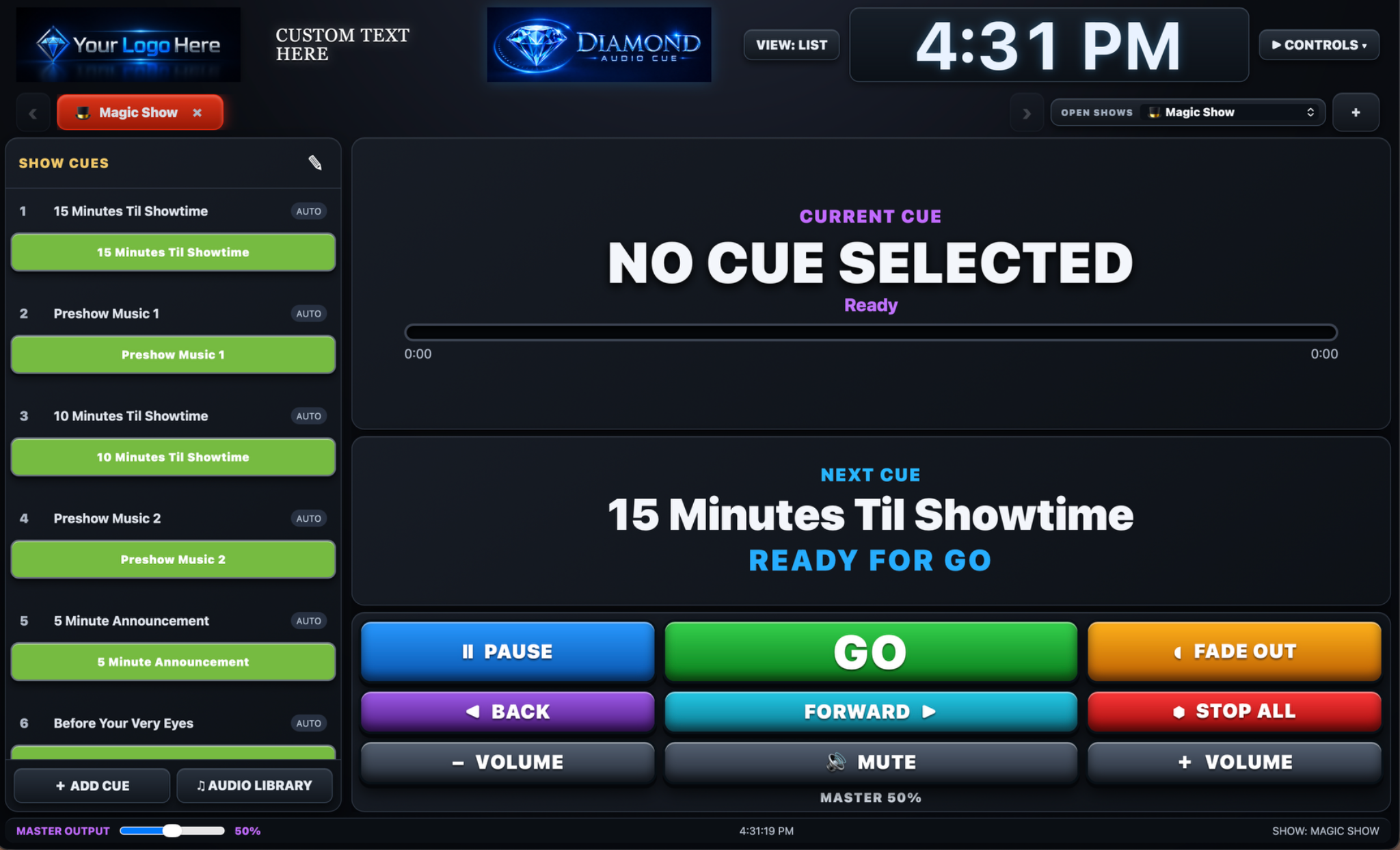
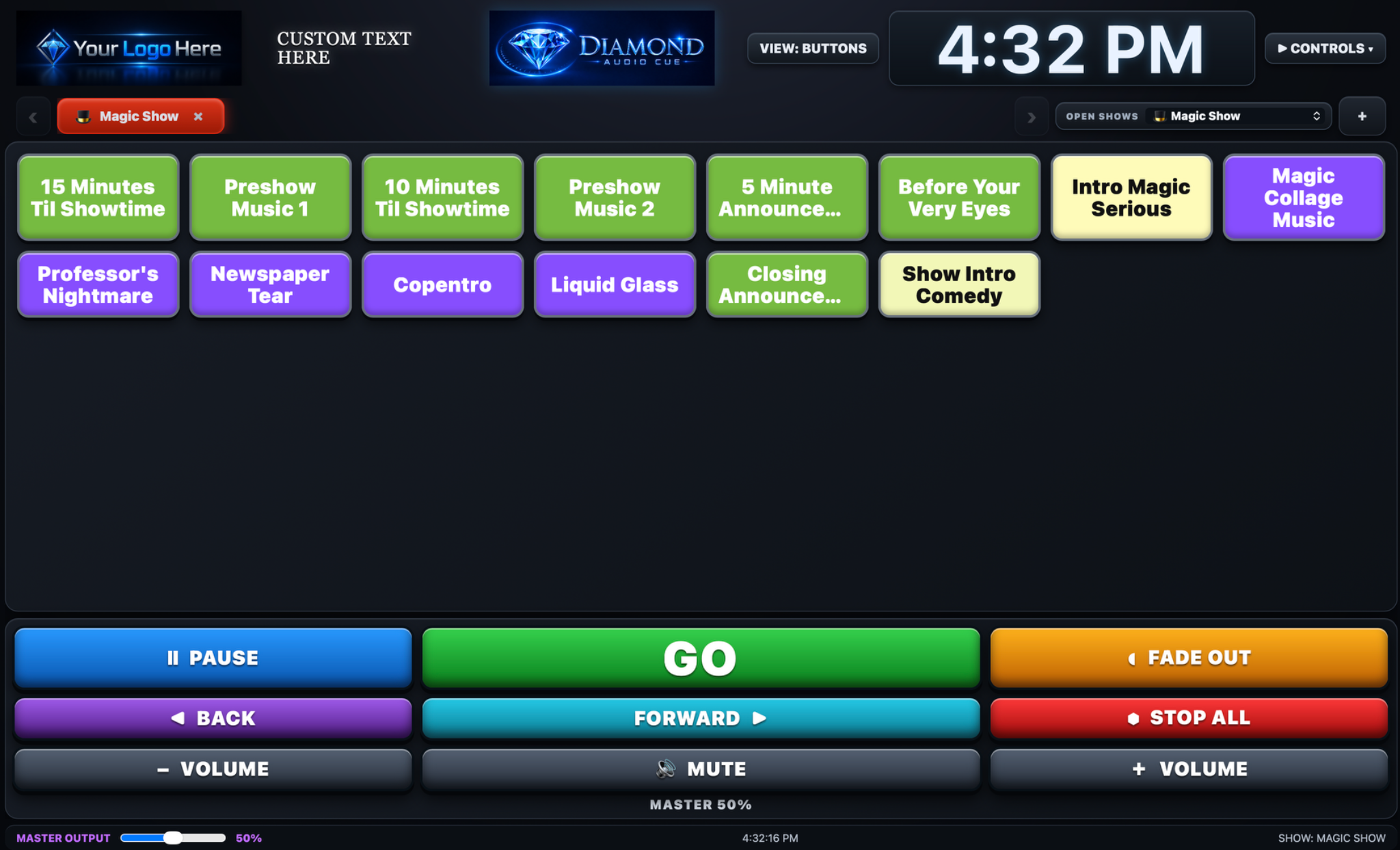
Both List and Button order can be rearranged. List Mode moves sequentially,
while Button Mode can be used either sequentially or manually.
Diamond Audio Cue was created by professional live performer Ron Diamond, drawing on years of real-world experience where timing, flexibility, and reliability matter.
From Mac, iPhone, and iPad show control to compatible external controllers, including AirTurn foot controllers, Dropbox show-file organization, and professional audio playback workflows, Diamond Audio Cue was created around the realities of live performance.
Developed from the perspective of someone who understands timing, reliability, and the pressure of live shows.
Clear controls, obvious next actions, and a workflow designed to keep your attention on the performance.
Use the Mac App for desktop performance or the Web App across supported devices and modern browsers.
Prepare complete shows, keep every cue organized, and trigger playback with confidence from the stage.
Move through the show in sequence with one clear action.
Jump directly to any cue when the performance changes.
Organize complete shows in folders and keep them ready for the next engagement.
Protect your show setup and move it when you need to.
Trigger cues hands-free without stepping out of the performance.
Switch the on-screen clock to an elapsed performance timer with Start, Stop, and Reset controls while you run the show.
Keep the current audio playing while you switch to another open show tab, so transitions do not interrupt the music.
Move between open shows directly from Stage View without returning to List View, while the active audio continues playing.
DEVELOPED FROM REAL PERFORMANCE EXPERIENCE
Diamond Audio Cue grew out of Ron Diamond's own need for a cue system that could handle both planned sequences and the unexpected turns of a live performance.
The developer personally uses Mac, iPhone and iPad devices for show control, Safari for the Web App, the dedicated Mac App for desktop performance, and compatible wired or Bluetooth controllers that send keyboard commands for hands-free operation, including compatible external controllers, including AirTurn foot controllers. Dropbox is part of the developer's own show-file workflow, while Google Drive, Microsoft OneDrive and other compatible cloud or file-sharing workflows can also be used.
Diamond Audio Cue Web is designed for modern browsers, extending access beyond Mac to Windows, Linux, Android, iPhone, iPad and other browser-capable devices.
Safari is part of the developer's own show workflow, but the Web App is not intended to lock performers to Safari or to Apple hardware.
Performers who prefer a standalone desktop environment can use the Diamond Audio Cue Mac App, while the Web App provides the broader cross-platform option for other computers, tablets and phones.
ONE PURCHASE. TWO WAYS TO RUN.
Your Diamond Audio Cue purchase includes both versions, under one license.
A dedicated desktop app for performers who want a focused show computer and standalone performance environment.
Run the cue system in a modern browser when portability and quick access are part of your workflow.
Deactivate an old device and reassign that slot to a replacement whenever needed.
THE DIAMOND MEDIA CUE PLATFORM
Diamond Audio Cue is the first product in a broader family of tools designed for professional live performance.
Diamond Audio Cue is designed for live performance environments where timing, simplicity, and reliable playback matter.
Flexible cue control for fast-moving shows with multiple performance elements.
Keep music and sound effects ready without taking attention away from the audience.
Trigger atmosphere, transitions, and key audio moments with confidence.
Manage backing tracks, walk-on music, transitions, and supporting audio cues.
Control walk-on music, presentation audio, stings, and audience moments from one place.
Professional cue playback for polished event performances and client-facing shows.
Organize and trigger show audio with a clear workflow built around live timing.
A straightforward cue system for events where playback needs to happen exactly on time.
TRY DIAMOND AUDIO CUE FREE
Experience the real Diamond Audio Cue workflow before you buy. Your 7-day trial is shared between the Mac and Web demos and is limited to 3 cues.
Open the Web Demo, enter your email, create a show, and use up to 3 cues during your 7-day trial.
Open Web DemoEnter your email to start or resume the same 7-day trial, then download the standalone Mac Demo.
Professional cue control for live performers — Mac + Web included with one license.
Already Purchased? Access Your Apps
One purchase. One license. Up to 3 active devices.
Device activations can be deactivated and reassigned to a new device when needed.
SUPPORT
Clear controls onstage, straightforward licensing, and tools for keeping your show organized.
Guidance for setup, show organization, cue operation, activation, and common performance tasks.
One purchase includes both Diamond Audio Cue for Mac and the browser-based Web version.
Protect your show information and restore it when moving between systems or recovering a setup.
COMMON QUESTIONS
Yes. The free demo runs for 7 days and allows up to 3 cues. The same trial period is shared between the Mac and Web demos when you use the same email address.
Yes. One purchase includes the standalone Mac app and the browser-based Web version.
Your license may be active on up to 3 devices at the same time. You can deactivate an old device and assign that slot to a replacement.
No. Diamond Audio Cue is a one-time purchase with no monthly or annual recurring software fee.
Yes. The Show Library lets you organize complete shows and keep them ready for different performances.
Yes. Diamond Audio Cue supports AirTurn control for hands-free operation during a live performance.
Yes. Backup and restore tools are built into the workflow so you can preserve and restore your show setup.